Tuesday, 26 July 2016

Game Maker Progress 15: Grid-Conquest


Hello everyone,

This week I decided to show you a small side-project I've been using as a rest when ever I felt like coding but wasn't keen on working on Privateer Dungeoneers. Up to this point - Grid-Conquest as I've called it, clocks up to around 4 hours work - I'm rather fond of how it's turning out!


The game is played by two players - each in control of a kingdom, blue or red. Your goal is to expand your kingdom and earn more gold than your opponent. With that in mind - there are a number of different territories or tiles you can purchase. 


At the moment - the game has a total of 5 different tiles. The farm tile is the most common tile as can be seen above. It provides the player a minor income as well as the ability to expand their territory. The mines are a more expensive tile that will provide a higher return than your farm tiles. The Windmill and Forge are tiles that are complimented by owning other tiles. The Windmill gives you more income the more farm tiles you own, and likewise the Forge gives you more income the more mines you own.

The Settlement tile is an expensive tile that gives you a small amount of income - however it has 1 distinction between other tiles. All other tiles require you to own territory adjacent to it before you can purchase it. Settlements are an exception - they allow players to purchase even if they do not own territory adjacent to it. This allows a player to expand in regions if they have the money to purchase a nearby settlement.

The Keep tile is currently not used in-game because I'm debating how to implement ways to interact between the two player kingdoms. Be it using raiding - or perhaps even allowing players to capture opposing player's regions. The Keep would serve as protection against raids and capture. That's the idea up until now at any rate. I still need to decide where I want to take that concept however. 

The game itself plays using a mouse - I am also thinking it might be a perfect fit for a tablet game since both players use the same 'mouse' input. It may also provide me a means to test out network coding and play. The way the game is coded does allow for more than 2 players - so that can also be an idea I can toy with!

Until next time,
Dylan

Tuesday, 19 July 2016

Game Maker Progress 14: Fog of War


Hello everyone! 

This week it was a small update - but a rather significant one!

I managed to implement a simple system that adds a fair amount to the game itself. Many games use fog of war to hide information from the player and encourage them to explore. In this situation the situation is similar! 


There are a few adjustments I am looking to make to the system - such as making the edge of the fog be smooth similar to how the walls work within the game using a Smart-Tile system. When I added this feature the game immediately felt far more fulfilling - not knowing whats behind the next corner is part of the value of the experience the game seeks to provide - exploration!

Until next time,
Dylan

Friday, 8 July 2016

Game Maker Progress 13: Recruitment


Hello everyone,

I'm quite excited by what I have to show you this week - I implemented the basic recruitment system into the game! The system is quite essential as it is required for you to not only re-coup fallen troops but also progress forward in terms of increasing your army size - allowing you delve deeper into dungeons, and defeat larger enemy forces!


Recruitment Screen

The system currently functions by allowing you to send recruiters to 5 different areas. Each area has it's own parameters that determine what types of troops come from that area. The amount of recruits you get depends on your Renown - which you earn by clearing dungeons and conquering enemy forces, you also lose renown by actions such as being defeated. You can also increase the amount of recruits from a particular location by sending in more recruiters to that particular area! 


After you send your recruiters - you move onto the recruitment report screen. As you can see - this screen shows you how many individuals you were able to recruit - as well as the types of units these recruits will join! 

As I continue to add different types of units - areas such as Cities and the Guilds will be a valuable location to seek elite units - however if you limit the amount of troops you have to only elite - then the loss of these units will impact your army greatly in terms of stats. Earning more renown and gaining recruiters would be the way to bring forward a large force and to progress forward! 


I look forward to bring you further updates! 
Until next time,
Dylan


Tuesday, 5 July 2016

Pixel Art 5: Piskel and Grey-scale Drawing


Hello everyone,

I recently discovered a new pixel art application that has proven to be quite useful - especially when the software I usually use isn't available. Piskel is both free and has most of the basic features you'd want to draw pixel art - I recommend checking it out, particularly if you want to have a web-based drawing software you can access from anywhere that you can access a browser!


Grey-scale Tree 1

Grey-scale Tree 2

Grey-scale Tree 3
After experimenting with Piskel - I also decided to try out a different style of pixel art. I decided to try out some grey-scale drawing and I immediately enjoyed it! The style is minimalist and the challenge of creating objects and representing lighting via only shades of grey was both entertaining and beautiful!

Grey-scale Scene

After I made the trees, I decided to create some rocks, and a cart. I made them as seperate tiles in Pyxel Edit and then experimented with the background and brought them all together to create the above image! I'm going to continue drawing more objects and adding onto the image and see what I can come up with!

Until next time,
Dylan

Saturday, 25 June 2016

Game Maker Progress 12: Smart-Tiles


Hello everyone,

I am excited to be showing what I have manage to implement in the past week or so. Those of you who follow the blog will remember I decided to code in what I nick-named a smart-tile system for my previous small project Sky High. The system simply checked what adjacent spaces were occupied by - such as a tile or empty space - and adjust it's sprite accordingly. Relative to this - that system was extremely simply since it worked with around 8 different variations if not less. 

This new smart-tile system I am using for Privateer Dungeoneers uses 48 different tiles - each with their own separate conditions to check whether it should be used or not. It took a lot of tweaking and adding new tiles (originally I only pictured around 20 tiles needed - after testing and checking for tiles that seemed off, the reality was I needed 48 at least). 


That being said - I love how the result turned out! The benefit of the system I have now is that it works with the Random Room Generator (RRG) fairly well! So any adjustments I make to the RRG means that the smart-tiles will simply adjust accordingly to what is needed! Another benefit is that whilst the above image shows an example of a room generated and the smart-tiles in action - I can simply add even more tiles than the minimum 48 to add variations to the various different tiles! 


Adding variations is far simpler since now I have the code and conditions set out - it's simply a case of creating the tiles and telling the system to randomly pick from a set of tiles that match that particular slot. As I add different types of tiles (dirt walls, rock walls, chasms, water and so on) they all can use the same system - it's just a case of changing the sprites!

This system was particularly important towards graphically improving this project - and whilst it had it's complications - I love the result and the potentially different additions I can implement with it!

Until next time,
Dylan

Tuesday, 21 June 2016

Game Maker Progress 11: Equipping Weapons


Hello everyone,

I've managed to get a start on being able to equip items to your character (force?) - it will take some explaining however for you to understand why I'm doing it the way I am. As a character you will have a number of 'units' that will in turn determine your stats. Equipment works in a fashion you would expect when you have multiple units to equip items to. Each unit can equip a weapon and an armour piece currently - which will give it a benefit to the stats it confers. 


Stats Diagram


The above diagram shows how the system will work. With the above - your character will have 15 attack total. If say all your footsoldiers had swords - then you would have a total of 20 attack. It is also worth noting that if you don't have any units to equip a particular weapon to (say bow to archers) then you cannot equip it. Units are the key point in this project for all systems to function - they determine your stats, they equip the items you find and they represent your overall progression in the game.

Equipping Items 1


As you can see in the Available tab you have 1 /  1 - the right integer shows how many of a particular weapon you have, the left integer shows how much you  have that you can equip to a unit. On the right under Equipment Details - you can see how much units have weapons / armour equipped out of your total of those units. The button between the two allows you to equip x1 weapon - depending on how I decide to expand on this I'll likely adjust this accordingly for the sake of convenience (if you have 100 units - I don't particularly want to have the player have to press the x1 button 100 times).

Equipping Items 2
Above we have the same interface - but we have equipped the Iron Sword to one of our footsoldiers! This system provides a lot of flexibility in terms of equipment. I can create simple equipment that confers certain benefits - but the player is free to equip as much or as little of that equipment as they wish - which means they could realistically create their own equipment in the overall sense. Let me explain. 

Lets hypothetically say for now that you are able to have different types of damage, physical, lightning, fire, so on. Say you have 10 footsoldiers with 1 attack base, you equip 5 with a sword that adds +1 attack and +1 fire damage; then you equip your other 5 with a sword that adds +1 attack and +1 lightning damage. That means in combat - you will deal a total of 20 normal damage, 5 fire damage and 5 lightning damage. Effectively the combination is something you as the player have made - not me as a developer. This opens up a number of possibilities to experiment and explore different equipment designs and sets!

Until now - you don't gain benefits from equipping items, and you cannot unequip them - I will be working on that next, but I think the most challenging part has been dealt with so I hope to not have too much issues on those two elements.

Until next time,
Dylan

Tuesday, 14 June 2016

Game Maker Progress 10: Small Fixes and Additions


Hello everyone,

The past couple of weeks have been slow - due to exams. However I made some additions and fixes which were simple so I at least got some work done plus it was a nice relaxation from the examination studying! 


One of the basic elements I made was the framework to build a main-menu. Up to this point I simply launched the project directly to the in-game screen. Having a framework to work with - I will be able to create a better main-menu once it gets to the point where it is needed! 


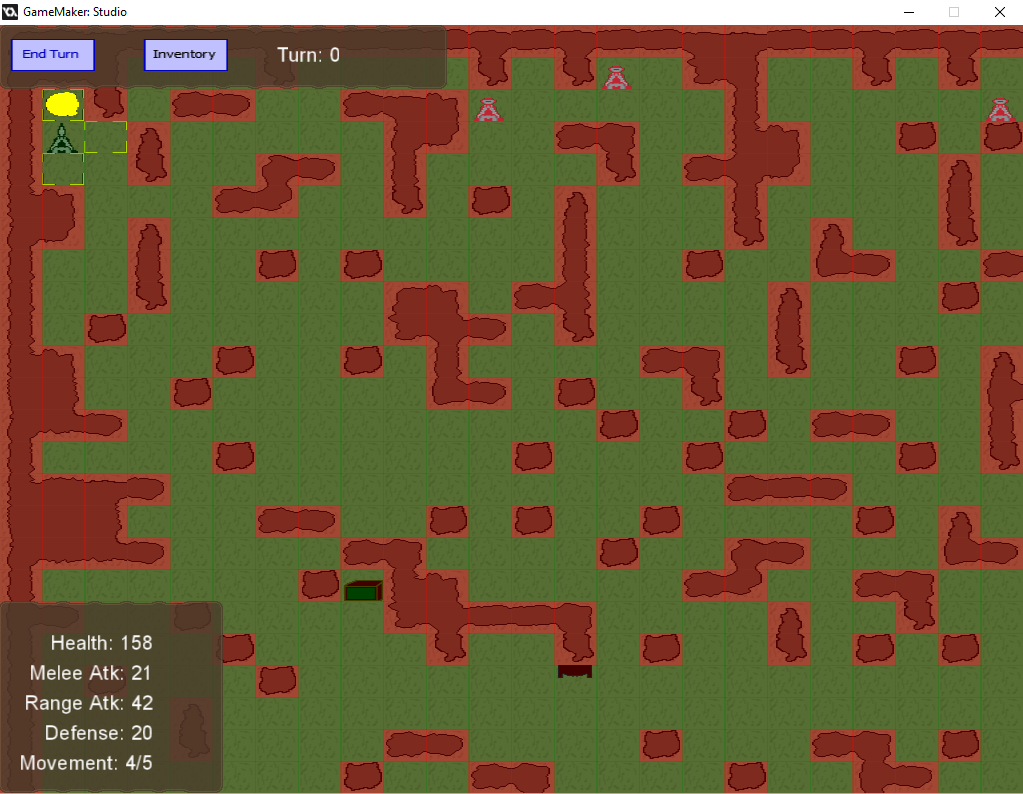
Immediately apparent is that I changed the graphics; these are still place-holders but I simply had gotten a bit tired at looking at the full-colour box - this was a slightly welcome change. Besides that - there are at least 2 other objects on the map now - a crate looking object and a door (The object above the player was only to signify an entrance). The crate was a place-holder for the generation of loot or chests. The door on the other hand would be the exit of the dungeon. I mostly added these so I could try to see how I would work them into the actual room generation - so currently they don't actually do anything.

If you look closely underneath the player avatar - you can also see a pickaxe icon on the wall; that indicates that you are able to dig through a wall (you cannot dig through the border wall however). This fixed a number of issues in terms of how the RRG generates - however it does mean I may need to get more creative in how to add to the exploration of the dungeon itself! Digging through a wall does take 2 movement points (plus 1 because you stay where you are whilst you dig) so there is a possibility to find ways to incentivise the player to be faster in clearing dungeons - but I will explore that realm later on.


Enemies also have a marker on them now - with the above image you are more able to see the 3 different markers for the movement! Once I get back into the full swing of things - I will start working most likely first on the equipment system. Whilst I do have a way of collecting and storing items - right now you can't actually equip them!

Until next time,
Dylan